
Archiving a staff user typically occurs if someone has left your organization. As this is often time sensitive please reach out to our support team if you require any assistance. Please note, archiving users can only be done by ADMIN users.
Step 1: Go to "Users"
- Click on the Gear icon
- Select Users
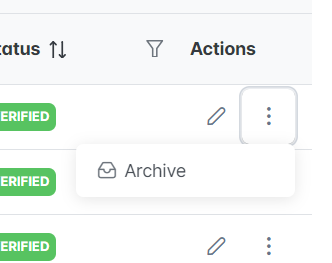
Step 2: Select the three dots next to the user under the Action column. Select Archive.
Step 3: When the Confirmation pops up, select Yes.
- Archiving a user will deactivate their SettLit login credentials and will remove them from any groups.
Great job, you now know how to archive a user. Please email support@settlit.legal if you are unsure or require further assistance.